
From tidying the data to finishing the interface, everything runs on conversation alone
Last time we looked at how to take a web page from “just viewable” to “genuinely good-looking”. But looking good is not enough — the content on the page still needs to be rich and varied.
Today we move on to the next step: connect your web page to a lightweight database and give it real substance.
We will use Hanzi Master as the example again. This time the goal is a stroke-learning card feature: 50 HSK Level 1 characters, each card carrying a writing animation, pinyin, compound words and example sentences, and switchable in one click.
That sounds like a lot of engineering work? In fact the whole thing is done through conversation alone.
Step 1: Do not let Gemini make up the data — bring in a dedicated AI to organise it
Many people start by asking Gemini to organise the data and write the code at the same time, and the result is that neither side is done well.
My approach is to split “organising the data” and “writing the code” into two steps and hand them to different AIs.
I went to Zhipu Qingyan first and gave it one sentence:
List 50 HSK Level 1 Chinese characters, with only the character and its pinyin + one compound word + one sentence
It immediately returned a clearly structured dataset, for example:
八(bā) → compound word: 八个 (eight) → sentence: 我有八个苹果。 (I have eight apples.)
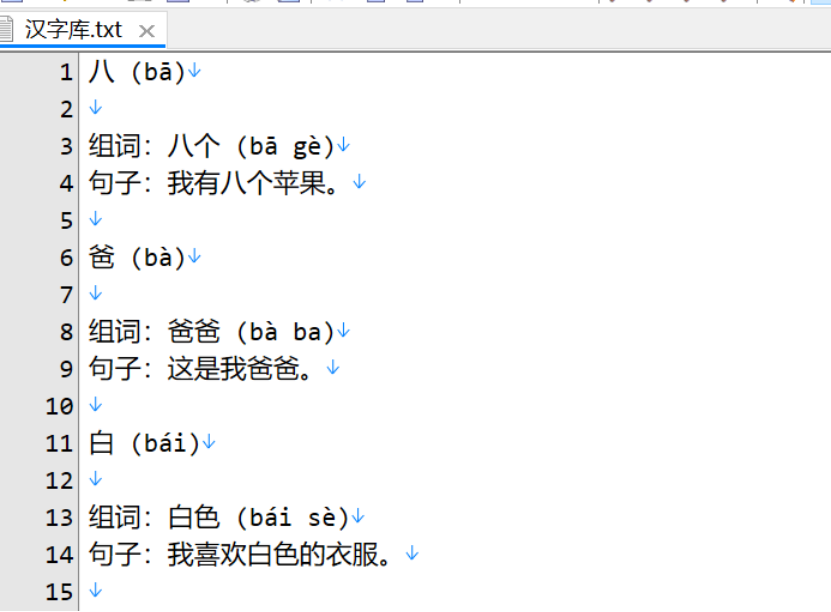
The Hanzi database returned by ChatGLM
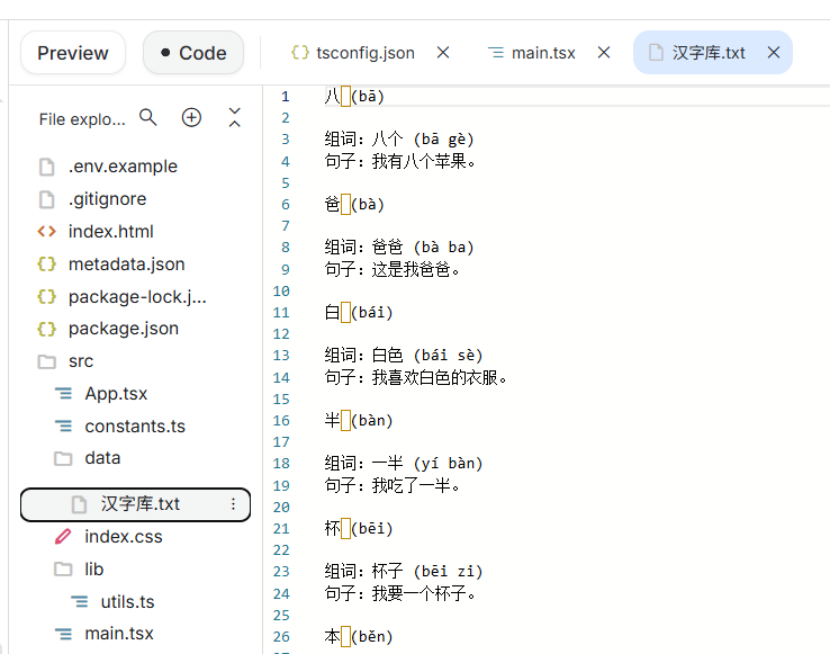
Importing the Hanzi database into the project code
Fifty characters, one uniform format, ready to use as they are.
Why not just let Gemini do it? Because giving the job to another AI is more efficient and saves tokens.
Step 2: One sentence to wire the data into the interface
The data is ready; now we feed it to Gemini. I uploaded the prepared Hanzi database file and said only this:
Based on the Hanzi database in data, add compound words and sentences to the cards of the stroke interface, and connect all the data into the stroke interface — one card per character, including the writing animation, pinyin, English translation, compound words with pinyin and translation, and example sentences with translation.
Gemini ran for about three minutes and finished everything in a single pass:
- Full data integration
All 50 characters wired into the interface, switchable with one click
- Upgraded card information
Rice-grid writing animation + basic information + compound word section + sentence section
- First UI version
Traditional borders and background colours, a “literati study” style
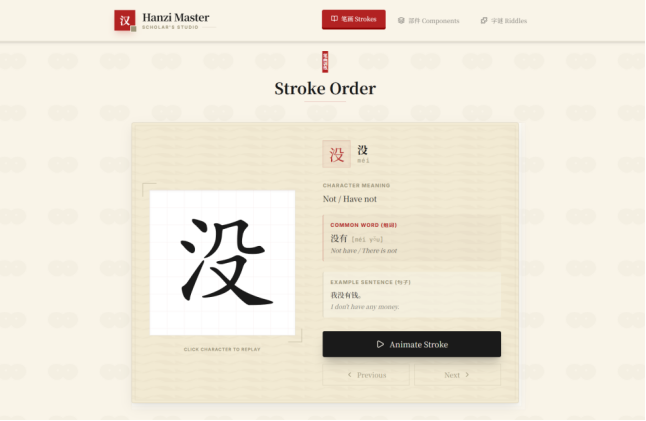
Gemini's first version of the stroke-learning interface
The result was already quite complete. But there was one problem — you had to scroll down to switch characters, and the experience was not smooth enough.
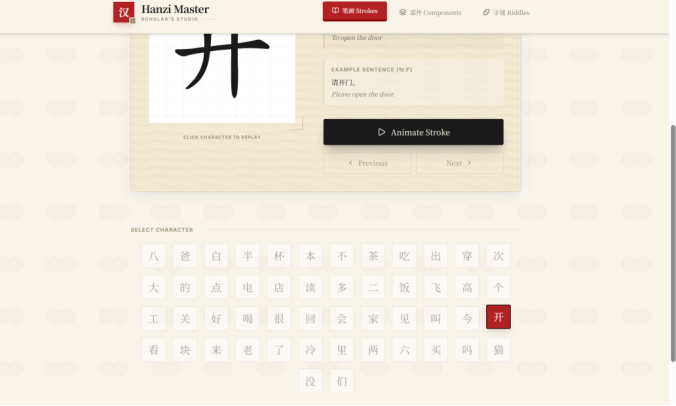
Step 3: From “stacking features” to minimal focus — what it takes is daring to say no
What follows is the process of polishing the interface again and again with the AI. This part follows the same line of thinking as the previous instalment:
Vague requirements — let the AI build them for us.
Round one: I expressed vaguely the designs I wanted to forbid, and it recommended a split-screen layout.
I asked Gemini to change the layout so that characters could be switched without scrolling up and down. It came up with a split-screen solution with a character library column on the left and a detail area on the right — the functional problem was solved, but the page became very crowded.
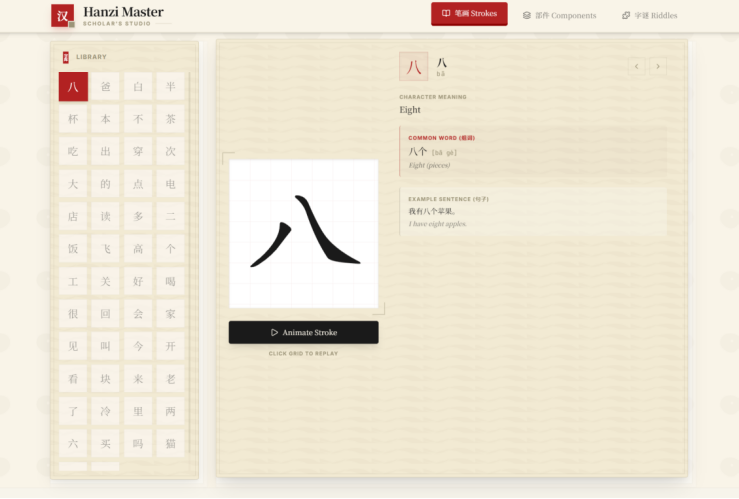
Round one: split-screen layout — functionally complete but visually crowded
Round two: I said “it is too cluttered, think again”, and it came up with a white-space design.
This time I gave no concrete proposal, just one sentence: “it is too cluttered now, see whether there is a better layout”. Gemini re-examined the design and came back with something completely different:
- A horizontal character scroller across the top
, like a refined scroll
- A large focused card in the middle
, with the writing animation on the left and the detail information on the right
- Removing redundant elements
: the search box, redundant icons, complex translucent layers
- Adding plenty of white space
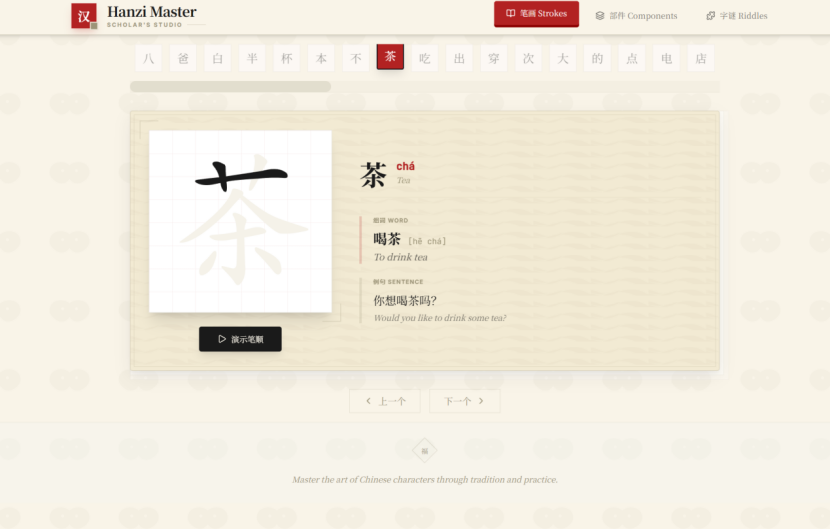
Round two: a return to minimalism — strip the clutter, keep only the core
From “cram everything in” to “keep only what matters most”, one rejection is enough.
Round three: I said “put the character card in the exact centre”, and it got there in one step.
The last step was precise fine-tuning. I made just one specific request — “put the character library below the character card, keep the card in the exact centre of the page, and add an 8s carousel for the character cards” — and Gemini achieved full-screen vertical centring with a flex layout. The page instantly took on the feel of a “professional teaching flashcard display” — clean, focused, well designed.
The final result
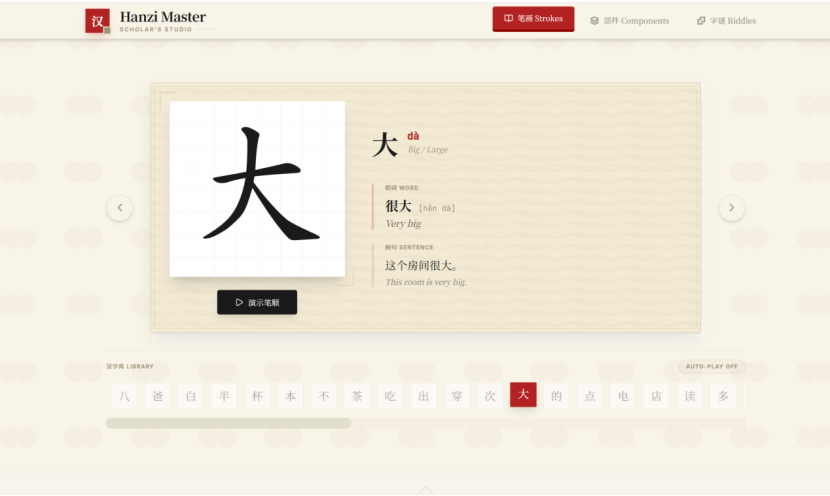
Final version: horizontal scroll + centred large card + automatic carousel
After three rounds of polishing, the final version is clean and comfortable, with the character card centred and in focus, plus a built-in automatic carousel.
Not a single line of code was written throughout the whole process — from preparing the data to finishing the interface, it all relied on conversation.
Three takeaways from this instalment
- Keep the data work and the code work separate
Let an AI that excels at organising handle the data and an AI that excels at development write the code — far more efficient than giving everything to a single model
- One sentence is enough to connect a database
As long as the data format is clear, wiring it into the interface really is a matter of one instruction
- Only by daring to say no can it be improved
The AI's first version is often functionally complete but over-designed; telling it which designs you do not want works better than stating the specific requirements you do want
— Vibe Coding for Beginners series · Part 4 —